Stereoscopic Orthophoto
The Stereoscopic Orthophoto sensor displays a single orthophoto in stereo, projected onto a digital terrain model (DTM) or digital surface model (DSM). Two virtual cameras, separated by the base specified in the panel, generate the stereo pair.
The sensor reads a .hmp (pyramidal height map) file containing the orthophoto and at least one digital model. Create it with the Stereo Orthophoto File Generator. Configure general options under Stereoscopic Orthophoto in Configuration.
Stereoscopic Orthophoto panel
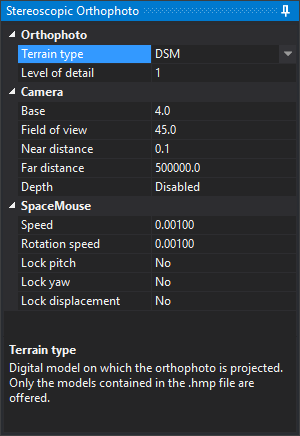
Loading the sensor adds the Stereoscopic Orthophoto panel on the right. It cannot be closed. Its lower area describes the selected property. Changes apply immediately.
Orthophoto
| Property | Description |
|---|---|
| Terrain type | Digital model used to project the orthophoto: DTM or DSM. Only models present in .hmp are offered. If both exist, DTM is initially selected |
| Level of detail | Divisor for tile mesh vertex count: 1, 2, 4, 8, 16, or 32. At 1, all digital model points are used; higher values produce simpler meshes. Initially 1 |
Camera
| Property | Description |
|---|---|
| Base | Distance between virtual cameras, in orthophoto pixels. A larger base increases perceived relief |
| Field of view | Vertical camera field of view, in sexagesimal degrees |
| Near distance | Near camera plane distance. Closer content is not drawn |
| Far distance | Far camera plane distance. More distant content is not drawn |
| Depth | Enabled: terrain hides vector geometries behind it. Disabled: geometries are always drawn over terrain |
SpaceMouse
These properties control camera operation with a 3Dconnexion SpaceMouse.
| Property | Description |
|---|---|
| Speed | Multiplier for SpaceMouse translations |
| Rotation speed | Multiplier for SpaceMouse rotations |
| Lock pitch | Ignore pitch rotations when enabled |
| Lock yaw | Ignore yaw rotations when enabled |
| Lock displacement | Ignore translations on all three axes when enabled |
Roll is always ignored, keeping the camera horizon fixed.
Digi3D.AI remembers Base, Field of view, Near distance, Far distance, Depth, Speed, and Rotation speed between sessions. Terrain type, Level of detail, and the three lock checkboxes reset whenever the sensor loads.