PERP_TO
Draw segments perpendicular to a given entity.
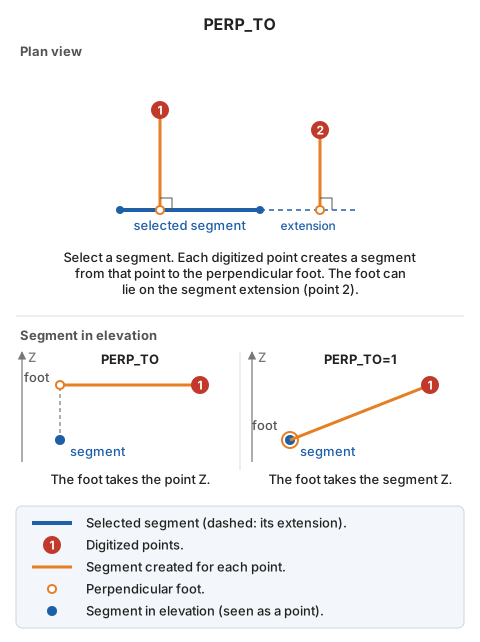
Parameters
| Parameter number | Description | Values | Optional |
|---|---|---|---|
| 1 | Elevation assignment mode for the perpendicular line | 0 or 1 | Yes |
Notes
Without parameters, the generated line takes the elevation of the point from which the perpendicular is drawn. Pass 1 as the parameter:
PERP_TO=1
The program assigns these elevations to the perpendicular line:
- At the endpoint from which the perpendicular is drawn, use that point's elevation.
- At the other endpoint, use the elevation of the entity to which the perpendicular is drawn.
Command characteristics
| Command type | Interactive command |
|---|---|
| Repeats automatically | Yes |
| Menu option | Draw/More/Multiple lines with two perpendicular points to an existing line |
| Toolbar | This command has no associated toolbar button |
| Extension | DigiNG.OrdenesStandard.dll |
| Implementation | Native |
| Related variables | No related variables |
| Related commands | PERP PERP_Z |
| Internal name |