EXTRACT_CENTROIDS_COD
Create a centroid, text at an interior point, in each polygon and closed line in the active drawing file bearing any selected code.
Parameters
Does not accept parameters.
Notes
Dialog box
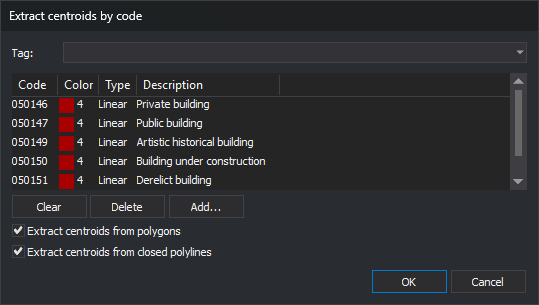
Running the command displays Extract centroids by code:
| Control | Description |
|---|---|
| Upper drop-down | List code table tags with the # prefix. Choosing one fills the code list with codes bearing that tag and clears the drop-down again |
| Code list | Codes of entities in which to create a centroid, with their color, type, and description |
| Clear | Empty the code list |
| Delete | Remove the selected code from the list |
| Add... | Open code selection and add chosen codes to the list |
| Extract centroids from polygons | If selected, create centroids in polygons |
| Extract centroids from closed polylines | If selected, create centroids in closed lines |
Clicking OK with an empty list displays Error: A code has not been specified for working and leaves the dialog box open. If both checkboxes are cleared, display Select at least one of the two options: polygons or closed polylines. and leave it open.
The list and checkboxes are not saved: each run starts with an empty list and both checkboxes selected. Only position and size are remembered.
Click Cancel to end without creating anything.
Entities processed
Traverse entities in the active drawing file and create a centroid in each satisfying all these conditions:
- it is a polygon, if the first checkbox is selected, or a closed line, if the second is selected. A line is closed if its first and last vertices coincide in X and Y, even with different Z values;
- it bears any listed code. One matching code suffices, and matching supports
*and?wildcards; - it is neither deleted nor hidden, and at least one code is visible in the drawing window;
- it is within the area of interest.
The command does not check whether the entity already has a centroid: running twice creates two centroids in each entity.
Centroid
Each centroid is text:
- with all the entity's codes;
- whose content is the entity's first code name, which may not be the listed code;
- with angle, height, and justification from AA, TH, and JT;
- with Z coordinate 0, regardless of the entity's Z.
The insertion point is always inside the entity, including concave entities:
- For a polygon, it lies on the horizontal line halfway up its bounding rectangle, inside the exterior boundary and outside holes.
- For a closed line, it is the center of its bounding rectangle if that center is inside the line. Otherwise, it is the midpoint of the longest interior segment of a horizontal line passing through no vertices.
The centroid is not the entity's center of mass.
UNDO removes all centroids created by the command in a single operation.
Command characteristics
| Command type | Immediate command |
|---|---|
| Repeats automatically | No |
| Menu option | Draw/Centroids/By code... |
| Toolbar | This command has no associated toolbar button |
| Extension | DigiNG.OrdenesTopologia.dll |
| Implementation | Native |
| Related variables | AA — set the active angle TH — set the text height JT — change text justification on insertion |
| Related commands | EXTRACT_CENTROID UNDO |
| Internal name | {356024A0-F29F-44DC-B9F4-82F46594836A} |