Expressions
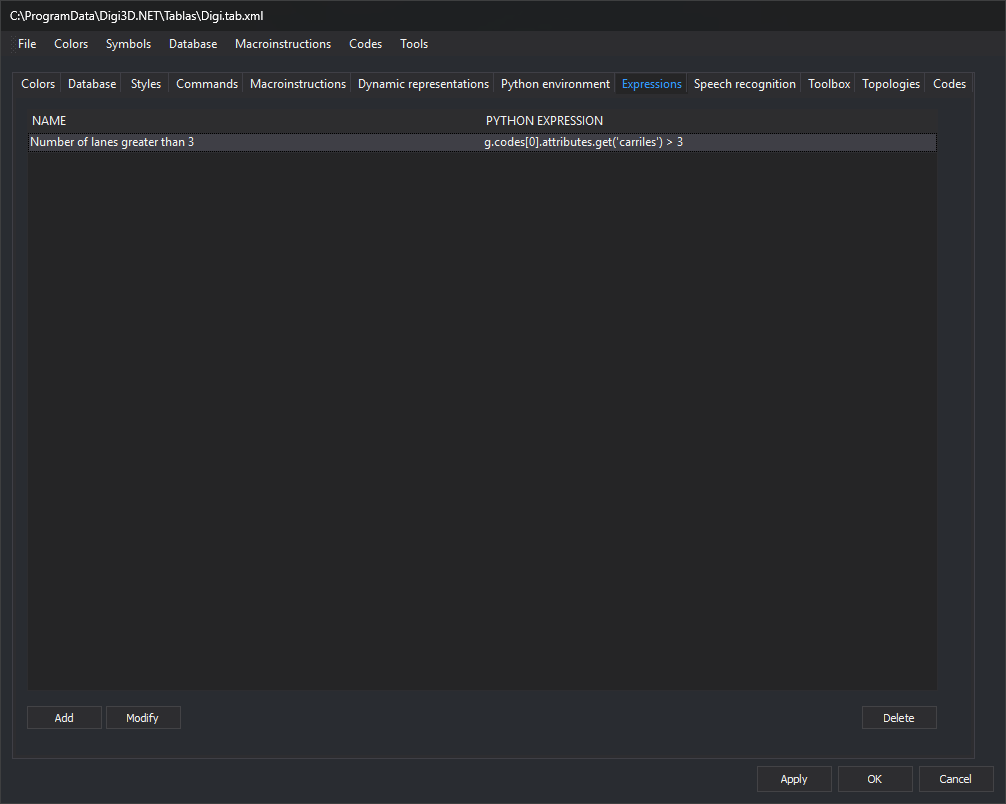
This tab, Expressions, defines named selections. Each selection is a Python expression evaluated for each geometry in the drawing files. The program selects entities for which the expression is true.
Each selection has a name and an expression. The tab's list shows one row per selection, with Name and Python expression columns. Names must be unique: if you add a selection with an existing name, the editor displays a warning and does not add it.
Buttons
| Button | Action |
|---|---|
| Add | Open the New selection dialog box to enter the name and expression. |
| Modify | Open the same dialog box with the selected row's name and expression. |
| Delete | Delete the selected row. |
Modify and Delete are enabled when you select a row. Changes on this tab are applied to the code table when you click Apply or OK.
Where selections are used
Selections modify the Digi3D.AI interface. Selection names from the active code table appear as options in two menus:
- View/(code table selections): run ON_ONLY_PYTHON_EXPRESSION with the selection's expression.
- Immediate/Select by Python expression.../(code table selections): run SELECT_PYTHON_EXPRESSION with the selection's expression.
ON_PYTHON_EXPRESSION, OFF_PYTHON_EXPRESSION, and ON_ONLY_PYTHON_EXPRESSION also accept a selection name as a parameter, preceded by #:
ON_PYTHON_EXPRESSION=#Edificios
The expression
- This is a single Python 3 expression, not a script:
import, assignments, and blocks are not allowed. Python 3 does not support the<>operator: use!=. To read the first code's text, replace the .NET nameg.Codes[0].Namewithg.codes[0].codefrom the Python application programming interface (API). - The variable
gcontains the geometry being evaluated. It is a Geometry object whose concrete type isPoint,Text,Line,Polygon, orComplex. - No variable is created for each database attribute. The first code's attributes are in the
g.codes[0].attributesdictionary (field name → value). To read a field, useg.codes[0].attributes.get('campo'), which returnsNoneif the field does not exist. - The expression must return
TrueorFalse.None(false) or a number (true if nonzero) is also accepted. A string, list, or other type produces an error. - The expression can use Python built-in functions (such as
lenortype) and names defined by the code table's Python environment, including its functions. If evaluating the expression accesses a name not defined in the__main__module (the variablegand environment names) or among Python's built-in names, Python raises aNameError. To useTextwithout thedigi3d.prefix, the environment must import that name with a line such asfrom digi3d import Text. The ON_PYTHON_EXPRESSION page details which names the expression can use.
| Expression | Meaning |
|---|---|
g.codes[0].code |
First code of the geometry. |
g.has_code('02*') |
The geometry has a code matching the pattern. Supports * and ? wildcards. |
len(g) |
Number of vertices. |
g[0] |
First vertex coordinates (x, y, z). |
type(g).__name__ |
Geometry type: 'Point', 'Text', 'Line', 'Polygon', or 'Complex'. |
g.area, g.perimeter_2d |
Area and plan perimeter. Only for lines and polygons. |
g.closed |
Whether the geometry is closed. Only for lines, polygons, and complex geometries. |
g.text |
Text string. Only for text geometries. |
If the expression fails for any geometry, such as g.area for a point, Digi3D.AI displays the Python error. Check the type of g before reading g.area: type(g).__name__ == 'Line' and g.area > 100. The Errors section of ON_PYTHON_EXPRESSION describes what happens when the expression fails.
New selection dialog box
The dialog box has these controls:
- Name: selection name.
- Field after
return: Python expression. - Code snippets and Add snippet: append the snippet chosen in the drop-down list to the expression.
The drop-down list offers operators (==, !=, <, >, <=, >=, and, and not, not, True, False) and these snippets for the geometry g:
| Snippet | Meaning |
|---|---|
type(g).__name__ == 'Point' |
Check the geometry type. There is one for each type: Point, Line, Text, Polygon, and Complex. |
g.has_code('code') |
The geometry has a code matching the pattern. |
len(g) |
Number of vertices. |
g[0] |
First vertex coordinates. |
g.codes[0].attributes.get('field') |
Value of a database field of the first code. |
g.area |
Area. |
g.perimeter_2d |
Plan perimeter. |
g.closed |
Whether the geometry is closed. |
g.text |
Text string. |
Replace code and field with the code or field you need.
Examples
All entities:
True
The expression is evaluated for each geometry and always returns true, so it selects all entities.
Entities whose first code is 020400:
g.codes[0].code == '020400'
Entities with 3 vertices:
len(g) == 3
Entities whose Plantas field equals 3:
g.codes[0].attributes.get('Plantas') == 3
Combined conditions:
g.codes[0].attributes.get('Propietario') == 'Dylan' and g.codes[0].attributes.get('Plantas') > 3 and g.codes[0].code == '010101' and len(g) == 7