COPY_R
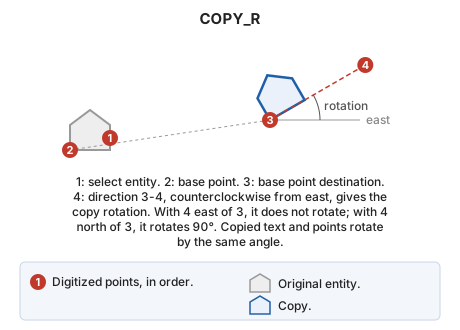
Copy a drawing entity and rotate it with a second input point.
Parameters
| Parameter number | Description | Optional |
|---|---|---|
| 1...n | Selectable geometry types, as letters in one or more parameters: L P is equivalent to LP |
Yes |
Notes
- Select the entity to copy.
- Digitize the base point.
- Digitize the base point destination.
- Digitize a fourth point. The copy rotates by the angle of the direction from the third point to the fourth, measured counterclockwise from east. If the fourth point is east of the third, the copy does not rotate; if north, it rotates 90°. Copied text and points rotate by the same angle.
If REPEAT is enabled, the command retains the entity and base point, then prompts again for the destination and rotation of another copy.
Command characteristics
| Command type | Interactive command |
|---|---|
| Repeats automatically | No |
| Menu option | This command has no associated menu option |
| Toolbar | This command has no associated toolbar button |
| Extension | DigiNG.OrdenesStandard.dll |
| Implementation | Native |
| Related variables | AA — active angle FORCE_ACTIVE_AA — force the active angle (AA) on generated entities FORCE_TH_ACTIVE — force the active height (TH) on generated entities FORCE_ACTIVE_CODE — force the active code on generated entities FORCE_ACTIVE_JT — force the active justification (JT) on generated entities JT — text justification REPEAT — repeat the last command executed |
| Related commands | COPYP COPY DUP DUPLICATE |
| Internal name |