Compute curves
This tool calculates curved elements from two defining parameters, deriving the remaining parameters useful for their definition.
Run it without an open file or from the curve definition dialog.
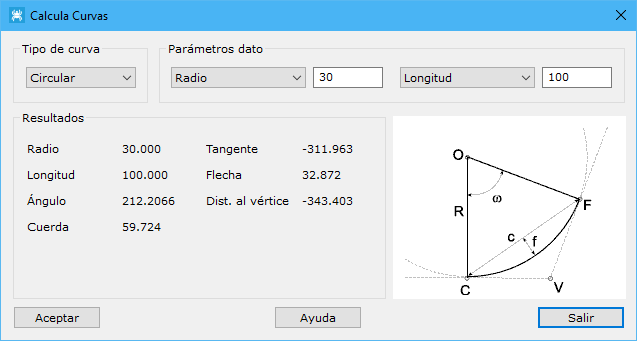
Two curve types can be defined:
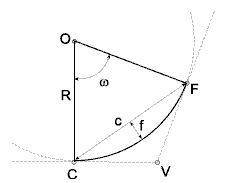
- Circular: defining parameters:
- Radius: radius in meters.
- Length: arc distance between C and F.
- Angle: angle w between radii to C and F, in grads. Fixed when opened from the curved element insertion dialog.
- Chord: straight-line distance between C and F, in meters.
- Tangent: distance between V and F or C, in meters.
- Shaft: maximum distance between arc and chord, in meters.
- Dist. to vertex: distance between O and V, in meters.
Not every combination has a solution, for example Length and Chord.
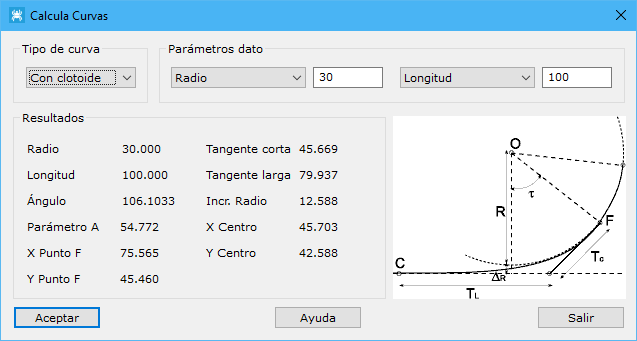
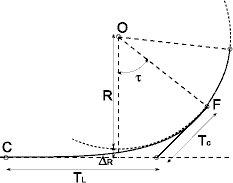
- With clothoid: defining parameters:
- Radius: central circle radius, in meters.
- Length: distance from C to F measured along the curve, in meters.
- Tao angle: angle between the perpendicular to the tangent from the circle center and the radius to tangency point F, in grads.
- A parameter: dimensionless curve constant.
Additional parameters are displayed:
- Short tangent: distance from tangency point F to the tangent line, measured along the circle tangent at F, in meters.
- Long tangent: distance along the tangent line from C to its intersection with the circle tangent at F, in meters.
- Incr. Radius: difference between the central circle radius and its center's ordinate.
- Point F coordinates: tangency point F coordinates measured from the tangent line.
- Center coordinates: circle center coordinates measured from the tangent line.
When opened from Curve insertion, fields in that dialog update automatically.