POINT_WEAVE
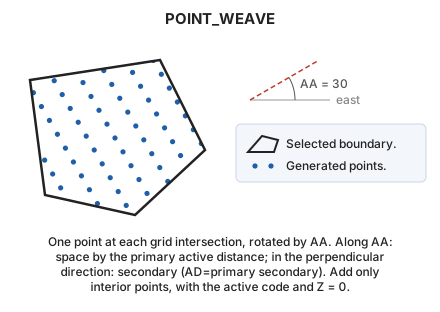
Fill the interior of a closed area entity with a dot pattern.
Parameters
| Parameter number | Description | Optional |
|---|---|---|
| 1 | Code or codes (one or more, separated by spaces) | Yes |
Without parameters, select the closed line to fill. With codes, fill all visible closed lines bearing them and end.
Notes
Place points at intersections of the stripes WEAVE would generate:
- Along the active angle, space points by the primary active distance.
- In the perpendicular direction, space them by the secondary active distance.
Set both with AD. Add only points inside the boundary, with the active code and Z = 0. The active code must be for point entities.
Command characteristics
| Command type | Interactive command |
|---|---|
| Repeats automatically | Yes |
| Menu option | Draw/More/Fill polygon with points |
| Toolbar | This command has no associated toolbar button |
| Extension | DigiNG.OrdenesStandard.dll |
| Implementation | Native |
| Related variables | AA — active angle AD — active distance REPEAT — repeat the last command executed |
| Related commands | SCRATCH SIMB WEAVE |
| Internal name |